
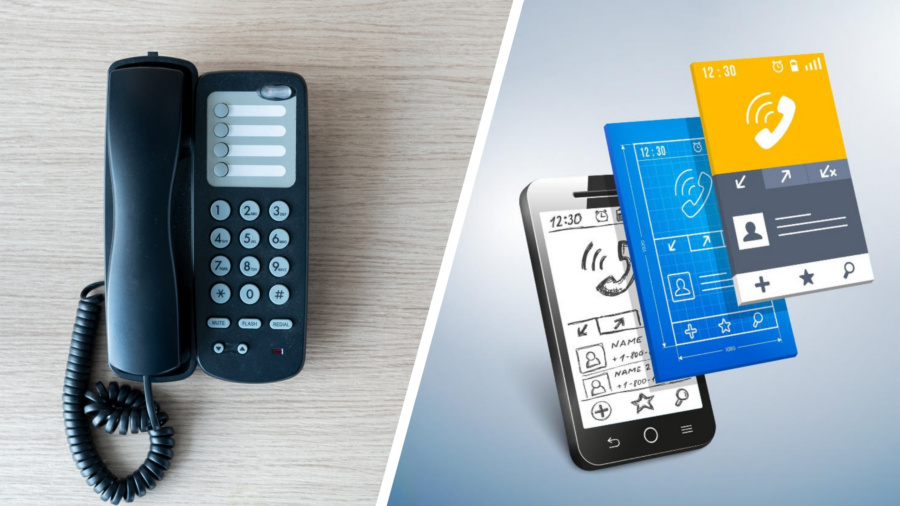
If you run a call center, your phones are everything. No incoming calls? No customers. No customers? No business. That means choosing the right phone system isn’t just some minor technical decision—it’s the key to your entire operation. Which is why so many contact centers are locked in a heated debate: hard phones or soft phones?
Well, we’re here to help you pick. Below, we’ll break down the differences between hard phones and soft phones, weigh the pros and cons, and help you figure out which system is best for your business communications.
And (spoiler alert) it’s probably not the one that will leave you tangled in phone cords and knee-deep in fees.
The point is not to make the subject sound more important than it is. The point is to make it easier to use. When a business understands the basics, it can make better decisions without getting pulled into noise, jargon, or a feature list that does not solve the real problem.
Hard Phones vs. Soft Phones: What’s the Difference?
The practical value is communication. When the phone system is clear, customers and employees can reach the right person without extra effort. That sounds simple because it is, but it is also where many businesses lose time. The problem is rarely one dramatic failure. It is usually missed calls, repeated messages, and small delays showing up often enough that people start treating it as normal.
What to notice
Before we start talking about which is the best option for your contact center, let’s define our terms. The same idea connects to Inbound call center solutions when the team needs a cleaner workflow.
Desk Phones: The Familiar Workhorses
Hard phones are your traditional desk phones, complete with handsets, buttons, and maybe even a flashy display if you’ve splurged for the “deluxe” model. These devices connect directly to the telephone network, whether that’s through a landline or VoIP (Voice over Internet Protocol) technology.
And these phones have been serving businesses for decades. Why? Because they’re simple, reliable, and familiar. Sure, they might not have the latest features, but you know it’ll get you where you need to go (as long as it’s plugged in, of course).
Soft Phones: The New Kids on the Block
Enter soft phone systems (sometimes called VoIP softphones). These software-based apps ditch the need for any physical phone altogether. Instead, they run on your existing devices–your computer, smartphone, or tablet–so you can make and receive calls from anywhere (even your kitchen island). All you need is an internet connection and a headset, and you’re good to go. No desk phone hardware is required.
This is why the details matter. A business does not need more complexity just to look prepared. It needs a setup that matches how people actually work, how customers actually ask for help, and how the team responds on an ordinary day. Good systems tend to feel quiet. Bad systems make themselves known.
The best version of this is not loud. It is a process that is easy to explain and easy to use. People should not need to understand every setting behind the scenes to get the benefit. They should only notice that the next step is obvious and the experience feels less difficult than it used to.
The Hard Truth About Hard Phones
The practical value is communication. When the phone system is clear, customers and employees can reach the right person without extra effort. That sounds simple because it is, but it is also where many businesses lose time. The problem is rarely one dramatic failure. It is usually missed calls, repeated messages, and small delays showing up often enough that people start treating it as normal. For teams comparing options, Outbound call center solutions gives that conversation a more practical starting point.
Why it matters
We know that hard phones have a lot of excellent qualities. Once they’re hooked up, they just work–no fuss, no software installation or server crashes. And there’s something so comforting about the tactile sensation of holding an old-school handset in your hand.
Hard phones have their place, but for modern, fast-growing call centers, they often create more problems than they solve. Here’s why:
- They require expensive hardware and installation: You’re paying not just for the phone but for the wiring, the installation, the tech guy who’s got to wire everything up, and the “just in case” replacement when something inevitably breaks.
- They’re not portable: These bad boys are tied to a desk. If you think you can just grab one and head home with it for the weekend, think again. And on-call agents? They can’t work from home; they’ve got to come into the office.
- They’ve got limited scalability: Want to add another agent? Be prepared to buy another phone and figure out where the heck to put it. It’s not the easiest process, especially if your call center is growing quickly.
- They lack the advanced features agents need: Your typical desk phone allows you to make and receive telephone calls…and that’s about it. Want to see someone’s face during a video call? Well, you’ve got to pay for the deluxe model. And forget about being able to see everyone during video conferencing sessions or access CRM information without getting distracted.
Yes, hard phones may have been the MVP of the past, but soft phone applications are the clear winner for today’s call centers.
And we’re going to show you why.
This is why the details matter. A business does not need more complexity just to look prepared. It needs a setup that matches how people actually work, how customers actually ask for help, and how the team responds on an ordinary day. Good systems tend to feel quiet. Bad systems make themselves known.
The best version of this is not loud. It is a process that is easy to explain and easy to use. People should not need to understand every setting behind the scenes to get the benefit. They should only notice that the next step is obvious and the experience feels less difficult than it used to. The surrounding process is easier to understand when Call recording is part of the plan.
8 Reasons Why Soft Phones Are the Smarter Choice for Call Centers
The practical value is communication. When the phone system is clear, customers and employees can reach the right person without extra effort. That sounds simple because it is, but it is also where many businesses lose time. The problem is rarely one dramatic failure. It is usually missed calls, repeated messages, and small delays showing up often enough that people start treating it as normal.
What to notice
Softphone systems, like the Vaspian One Soft Phone, give your contact center all kinds of advantages and abilities that a typical hard phone cannot. Here are just a few:
1. Hire, Scale, and Onboard at Warp Speed
Hard phones mean ordering, shipping, setting up, and troubleshooting new devices whenever you bring on new agents. That’s slow, expensive, and frustrating. Plus, if you’re growing fast, it’s a logistical nightmare trying to keep up.
With soft phones? Send a login link, and they’re good to go in minutes. No hardware, no IT intervention, no waiting. Whether you’re onboarding 1 agent or 100, it’s instant. Imagine hiring a remote worker in another state and getting them fully operational in under 10 minutes—hard phones could never.
That’s the joy of scalable telecom solutions like Vaspian One.
2. Your Agents Want Flexibility—Give It to Them
Call center work doesn’t have to mean being glued to a desk anymore. Whether you’re embracing remote work or just want backup options in case of office issues, soft phones let your agents take calls from anywhere.
Your top performer wants to work from home because of a long commute? No problem. Someone needs to take a shift while traveling? Easy. No more disruptions, no more lost productivity. Teams that are sorting through this can use Call recording benefits to connect the problem to a more specific next step.
3. No More “Oops, the Office Is Closed” Moments
If a storm knocks out your office’s power, or your building is suddenly inaccessible (snowstorm, flood, zombie apocalypse—whatever), traditional phones are useless. They leave your business in the dark, unable to communicate with customers when they need you.
But with a soft phone application, your team can simply switch to mobile data or another Wi-Fi network and keep working. No missed calls. No lost revenue. No downtime. Customers will never even know there was an issue.
4. Ditch the Hardware, Keep the Cash
Let’s talk dollars and cents. Hard phones are expensive. Buying them, installing them, maintaining them—it all adds up. And when they break? You’re shelling out even more money.
Softphone software? Zero hardware costs. No broken devices. No replacements. Just software that updates itself and keeps running. Plus, with everything in the cloud, you’re cutting down on energy costs, repair fees, and all those sneaky hidden expenses that come with physical hardware.
5. Plug & Play with the Tools You Already Use
Your CRM, call tracking, and analytics aren’t going anywhere, and they shouldn’t have to. Soft phones easily connect with tools and platforms your team already relies on.
Imagine an agent answering a call and instantly seeing the caller’s history, recent interactions, and previous complaints—all without having to ask, “Can I get your account number?” It’s seamless and efficient and eliminates those awkward moments when customers wonder if your company even knows who they are. That context also matters for Auto dialers for call centers, especially when the current process feels harder than it should.
6. More Features, No Extra Cost
Hard phones? They’re limited to, well, making voice calls. Okay, maybe video if you want to pay an extra $150. But that’s about where their usefulness ends.
But soft phones? Well, since they’re an extension of your business phone system, they come loaded with the key features you wish your hard phone had—without the extra price tag.
Voicemail-to-email? Included.
Instant messaging? Standard.
Auto-dialing, call analytics, and real-time reporting? All built in. This is why Hosted phone system benefits should be considered inside the article’s broader communication strategy.
Want to record calls for training? Done.
Need voicemails transcribed and sent straight to your inbox? Easy.
Armed with a single softphone app, you can manage all your call center communication–from phone calls to instant messages. Especially if that app is the Vaspian One Soft Phone.
7. Say Goodbye to Bad Call Quality
Still worried about call clarity? That’s ancient history. Soft phones like Vaspian’s are equipped with the proper codecs and noise-cancellation capabilities to deliver voice and video calls that sound better than your traditional desk phone. Background noise reduction means your agents sound like the professionals they are, not like they’re calling from a cell phone inside a wind tunnel.
8. Stronger Security and Compliance
Handling sensitive customer data? You need security that hard phones just can’t provide. Soft phone technology (from Vaspian, at least) comes with built-in encryption, multi-factor authentication, and compliance tools to keep your communication data safe.
And with Vaspian One Soft Phone, security is locked down tighter than Fort Knox. No rogue agents writing down customer credit card numbers, no unmonitored data floating around—just rock-solid protection. This is especially important when agents are using a mobile phone connected to public Wi-Fi.
This is why the details matter. A business does not need more complexity just to look prepared. It needs a setup that matches how people actually work, how customers actually ask for help, and how the team responds on an ordinary day. Good systems tend to feel quiet. Bad systems make themselves known.
The best version of this is not loud. It is a process that is easy to explain and easy to use. People should not need to understand every setting behind the scenes to get the benefit. They should only notice that the next step is obvious and the experience feels less difficult than it used to.
How It Impacts Your Call Center Agents
The practical value is communication. When the phone system is clear, customers and employees can reach the right person without extra effort. That sounds simple because it is, but it is also where many businesses lose time. The problem is rarely one dramatic failure. It is usually missed calls, repeated messages, and small delays showing up often enough that people start treating it as normal.
Why it matters
Still not convinced? Let’s look at how hard phones and soft phones stack up in real-world situations.
Scenario 1: Inbound Call Center Handling High Volume
A customer support team fields thousands of calls a day. With hard phones, they’re stuck at their desks, and if the company grows, they have to buy and install more phones or phone lines.
With soft phone service like Vaspian One, new agents can be added instantly, remote workers can join your team stress-free, and managers can monitor calls in progress easily—all without touching a single piece of hardware.
Scenario 2: Outbound Sales Team on the Go
Your sales team is always on the move, calling leads and closing deals. With hard phones, they’re tied to their office desks, missing opportunities while competitors zoom past you.
With Vaspian One Soft Phone, they can make calls over the internet from laptops or cell phones, access CRM data instantly, and close deals from anywhere. It’s faster, more flexible, and keeps your sales team limber.
This is why the details matter. A business does not need more complexity just to look prepared. It needs a setup that matches how people actually work, how customers actually ask for help, and how the team responds on an ordinary day. Good systems tend to feel quiet. Bad systems make themselves known.
The best version of this is not loud. It is a process that is easy to explain and easy to use. People should not need to understand every setting behind the scenes to get the benefit. They should only notice that the next step is obvious and the experience feels less difficult than it used to.
The Final Verdict: Soft Phones Win—And So Do You (especially with Vaspian)
The practical value is communication. When the phone system is clear, customers and employees can reach the right person without extra effort. That sounds simple because it is, but it is also where many businesses lose time. The problem is rarely one dramatic failure. It is usually missed calls, repeated messages, and small delays showing up often enough that people start treating it as normal.
What to notice
Hard phones had their moment, but that moment was sometime before streaming services and food delivery apps took over the world. Softphone technology is the future, and it’s time to get on board.
And Vaspian can help you get there. Our call center solutions come with soft phone functionality built in (hey there, Vaspian One), so you can enjoy all the benefits of soft phone features right from the jump on your computer or mobile device.
The only real question is: Are you ready to upgrade? Because your competition probably already is. Reach out to your team at Vaspian to make your call center better—today.
This is why the details matter. A business does not need more complexity just to look prepared. It needs a setup that matches how people actually work, how customers actually ask for help, and how the team responds on an ordinary day. Good systems tend to feel quiet. Bad systems make themselves known.
The best version of this is not loud. It is a process that is easy to explain and easy to use. People should not need to understand every setting behind the scenes to get the benefit. They should only notice that the next step is obvious and the experience feels less difficult than it used to.
FAQ
Here are a few common questions about hard phones vs. soft phones: which is best for your and what it means in day-to-day business.
Why does hard phones vs. soft phones: which is best for your matter for a business?
It matters because it affects how customers and employees move through everyday work. When the process is clear, people spend less time dealing with missed calls, repeated messages, and small delays.
What is the most important thing to get right?
The most important thing is making the next step clear. A business does not need a complicated setup if a simpler one helps people reach the right person without extra effort.
How do you know when the current approach is not working?
You usually see it in repeated friction: delays, confusion, missed handoffs, or people creating workarounds. Those are signs the process needs attention.
Does every business need the same solution?
No. The right setup depends on how the business works, who needs to respond, and what customers expect when they reach out.
Where should a business start?
Start with the places where people already get stuck. Fixing the obvious friction first is usually more useful than chasing a long list of features.